
Hi.
On a former project of WebBuilder (release 9) I set a table which had no background.
Now, with WB 21 the table has a white background and I can't modify it nor any cell background color. The options for Background in the Properties pallet a greyed and cannot be modified.
Could someone please help? Thank you.
Table background color
Forum rules
IMPORTANT NOTE!!
DO YOU HAVE A QUESTION OR PROBLEM AND WANT QUICK HELP?
THEN PLEASE SHARE A "DEMO" PROJECT.
PLEASE READ THE FORUM RULES BEFORE YOU POST:
http://www.wysiwygwebbuilder.com/forum/viewtopic.php?f=12&t=1901
MUST READ:
http://www.wysiwygwebbuilder.com/getting_started.html
WYSIWYG Web Builder FAQ
IMPORTANT NOTE!!
DO YOU HAVE A QUESTION OR PROBLEM AND WANT QUICK HELP?
THEN PLEASE SHARE A "DEMO" PROJECT.
PLEASE READ THE FORUM RULES BEFORE YOU POST:
http://www.wysiwygwebbuilder.com/forum/viewtopic.php?f=12&t=1901
MUST READ:
http://www.wysiwygwebbuilder.com/getting_started.html
WYSIWYG Web Builder FAQ
-
BaconFries

-

- Posts: 6292
- Joined: Thu Aug 16, 2007 7:32 pm
Re: Table background color
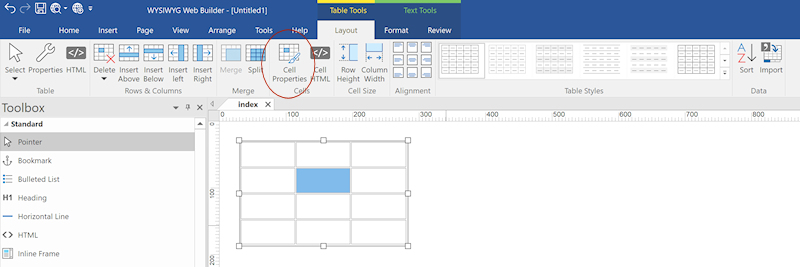
You can set the cell color via the cell properties.Now, with WB 21 the table has a white background and I can't modify it nor any cell background color
-
crispy68

-
- Posts: 3206
- Joined: Thu Oct 23, 2014 12:43 am
- Location: Acworth, GA
- Contact:
Re: Table background color
To change the background color, simply right click on the table, choose Table Properties, choose Style tab and change the background color. Do the same for a cell but choose Cell Properties.