V 20.0.2 New Features

All WYSIWYG Web Builder support issues that are not covered in the forums below.
Forum rules
IMPORTANT NOTE!!

DO YOU HAVE A QUESTION OR PROBLEM AND WANT QUICK HELP?
THEN PLEASE SHARE A "DEMO" PROJECT.


PLEASE READ THE FORUM RULES BEFORE YOU POST:
http://www.wysiwygwebbuilder.com/forum/viewtopic.php?f=12&t=1901

MUST READ:
http://www.wysiwygwebbuilder.com/getting_started.html
WYSIWYG Web Builder FAQ
Post Reply
User avatar
Starb7
 
 
Posts: 333
Joined: Tue Sep 05, 2006 12:35 pm
Location: Derbyshire

V 20.0.2 New Features

Post by Starb7 »

Hi Pablo

Been trying the new features and to he honest, I am struggling with a couple of them. So, rather than a page of info, do you have any working project we can download to see how you use them, eg how you made the 'demo pages'? Other comments are 'would be nice', and perhaps to add into suggestions?

A working Project to Play with: Glassmorphism - how did you make that page, specifically if you wanted it to be 'responsive' using such as a Layout Grid.
A working Project to Play with: Easy Breakpoints - again when using a Layout Grid.

Suggestion: Overpaste - works well and will save a lot of time but how can I paste it so it opens in a new page? perhaps an Overpaste+ where you hold the option key down when you paste?

I do make use of (a lot, I'm lazy!) the 'Layout Grid' option as this can very easily sort a lot of responsive funtions & formatting without having to use fixed layouts and BreakPoints. The downside of course, is you can't just place items where you want in a Layout Grid - now, that would be nice :)

Great work as always and worth the upgrade cost - thanks for you hard work as always.

Many thanks
Starb
User avatar
Pablo
 
Posts: 24597
Joined: Sun Mar 28, 2004 12:00 pm
Location: Europe
Contact:

Re: V 20.0.2 New Features

Post by Pablo »

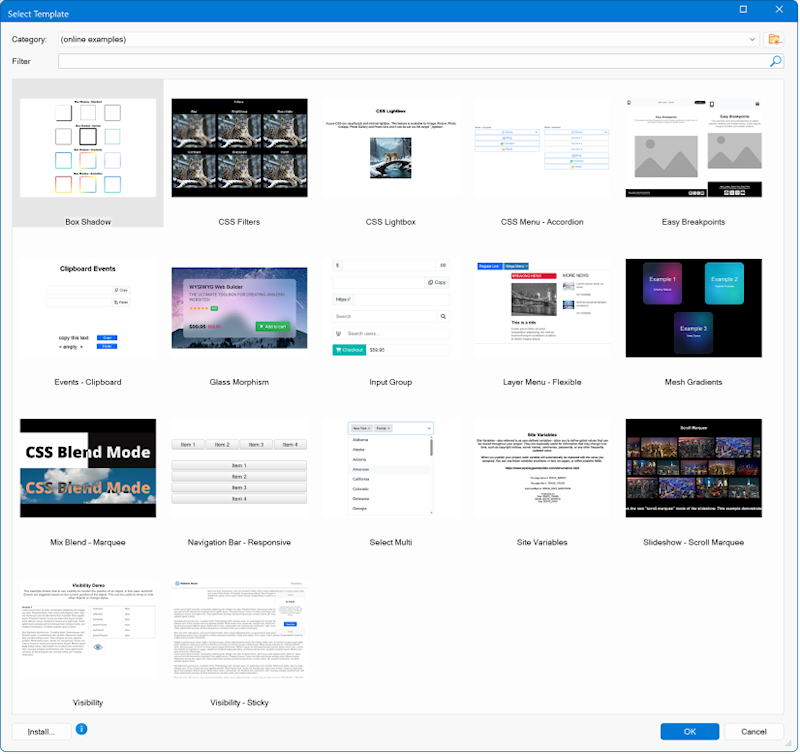
As usual, you can download the examples via Help -> Examples

Image

Also, all new templates use easy breakpoints.
https://wysiwygwebbuilder.com/templates2026.html
but how can I paste it so it opens in a new page? perhaps an Overpaste+ where you hold the option key down when you paste?
There is no shortcut for that, you will need to set this in the properties.
The downside of course, is you can't just place items where you want in a Layout Grid - now, that would be nice :)
Elements cannot be fixed and flexible and the same time. It is either one or the other.
But maybe you can try 'sections'?
https://wysiwygwebbuilder.com/section.html
User avatar
Starb7
 
 
Posts: 333
Joined: Tue Sep 05, 2006 12:35 pm
Location: Derbyshire

Re: V 20.0.2 New Features

Post by Starb7 »

Thank you - very much appreciated.
User avatar
Starb7
 
 
Posts: 333
Joined: Tue Sep 05, 2006 12:35 pm
Location: Derbyshire

Sections within Cell Grid

Post by Starb7 »

Hi Pablo

I have been trying out the 'Section' feature and that might work if I could just get past this niggle...

I have a sample page here https://www.supake.co.uk/Sections/index.html and that works fine until I try to reduce the browser width, which then causes the text elements (and I guess any others I had in there) to overlap each other.

My question woulod be, how to I make the text reponsive or better still, make the bottom of the Section grow to accomate the elements within it, ie so they don't overlap each other.

Probably not possible, but no harm in asking :)

Cheers
Paul
User avatar
AliGW
 
 
Posts: 542
Joined: Thu Dec 19, 2024 3:41 pm

Re: V 20.0.2 New Features

Post by AliGW »

Please provide a demo file (WWB file) so that we can see what might be wrong. You can use a file-sharing site for this.

Might have been a better idea to start a new thread for this issue ... :P
Ali
Retired, but still loving to learn & very busy.
https://alisongwright.me.uk
Novice with WWB, but was an avid user of Serif WebPlus before.
Fairly expert at Microsoft Excel (but not VBA) & Affinity by Canva (for page layout).
User avatar
Pablo
 
Posts: 24597
Joined: Sun Mar 28, 2004 12:00 pm
Location: Europe
Contact:

Re: V 20.0.2 New Features

Post by Pablo »

The Section object has several ways to make it responsive (flexible) via the 'Layout' options.

Did you read the documentation about this?
https://www.wysiwygwebbuilder.com/section.html
User avatar
Starb7
 
 
Posts: 333
Joined: Tue Sep 05, 2006 12:35 pm
Location: Derbyshire

Re: V 20.0.2 New Features

Post by Starb7 »

Hi Pablo

I thought I did! I'll take another look and get the demo project too and have a tinker. If I get stuck, I'll start a new thread, upload a sample project and ask for more help if needed.

Sections are so close to exactly what I need so will persevere with them, thanks.

Cheers
Paul
User avatar
Starb7
 
 
Posts: 333
Joined: Tue Sep 05, 2006 12:35 pm
Location: Derbyshire

Re: V 20.0.2 New Features - Sections

Post by Starb7 »

Hi Pablo

Sorry, I am still stuck. I have re-read the info and notes and downloaded the demo project.

I was going to start a new topic but as this is all related, i have continued this one and edited the Suject to highlight 'Sections'

If you go to https://www.supake.co.uk/Sections/index.html you can see i have just extracted a bit of your demo and added another block of text under the left had image. This works fine until you reduce the width of the browser page, just where the page goes to 'mobile' level. As it gets narrower, the onjects move as expected until the two blocks of text clash and overlap. If you keep reducing, the responsive width kicks in and all is good again.

So, is it possible, before the responsive bit kicks in, to make the section 'grow' to accomodate the text, eg set a minimum margin between the objects and expand where needed? I am going to presume you can't, as before, and just have to make it fit as best as possible.

I have uploaded the project as tou see it as a separate page/project.. just in case you can suggest a way around it. It is here: https://www.supake.co.uk/sections.zip

Many thanks for you patience as always!

Paul
User avatar
AliGW
 
 
Posts: 542
Joined: Thu Dec 19, 2024 3:41 pm

Re: V 20.0.2 New Features

Post by AliGW »

If you drag the red section box a bit longer, the problem is avoided.
Ali
Retired, but still loving to learn & very busy.
https://alisongwright.me.uk
Novice with WWB, but was an avid user of Serif WebPlus before.
Fairly expert at Microsoft Excel (but not VBA) & Affinity by Canva (for page layout).
User avatar
Starb7
 
 
Posts: 333
Joined: Tue Sep 05, 2006 12:35 pm
Location: Derbyshire

Re: V 20.0.2 New Features

Post by Starb7 »

Not really as that makes the section box bigger (and you can't manually resize the 'red' box) which then leaves big gaps in the browser view making the page look untidy. Ideally, the section needs to grow to accomodate the content when the window is resized.
User avatar
Starb7
 
 
Posts: 333
Joined: Tue Sep 05, 2006 12:35 pm
Location: Derbyshire

Re: V 20.0.2 New Features

Post by Starb7 »

Hi Pablo

Reply for you - I have read it again (several times!) and think I have sorted it.

There is a trade-off between some responsive text and no overlapping issue, the latter I have now mastered!

I missed the point about setting the Setions 'Layout' to 'Full Width: [false]' and now it works how I need it.

I'm still looking at all the combos here and I am sure I'll get it exactly how I want it to look!

Thanks to all for looking and chipping-in - much appreciated.

Cheers
Paul
Post Reply