Pablo wrote: Thu May 23, 2024 3:19 pm
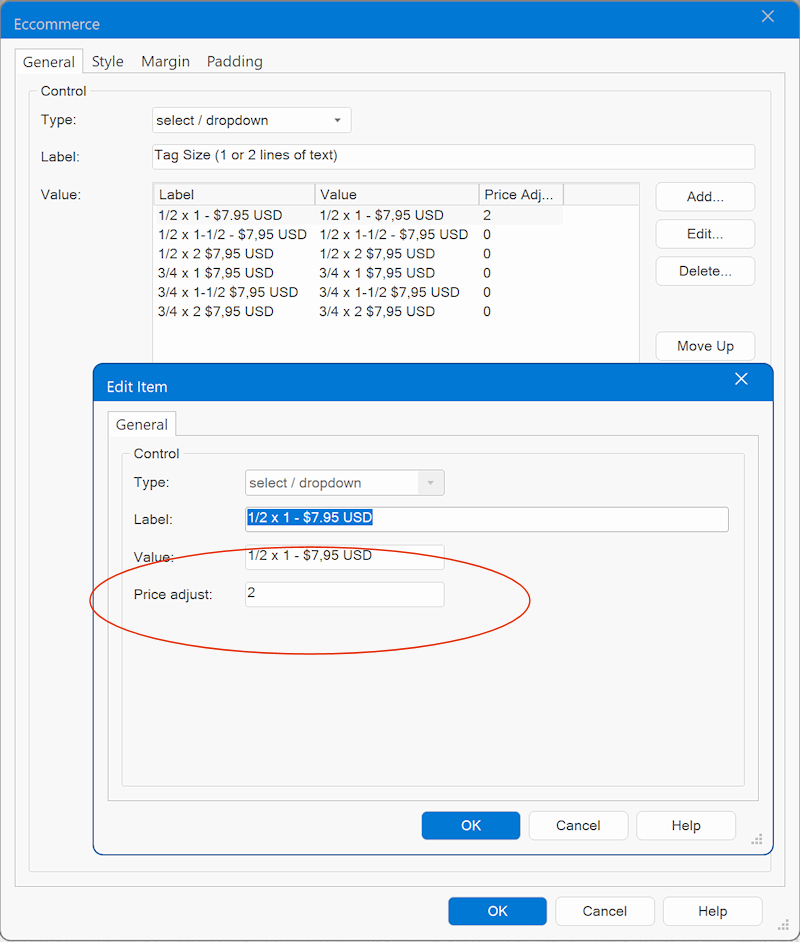
You did not set a value for 'price adjust'
Hi Pablo... I'm not at the PC now... but I really don't get it... why or what shall I set in Price adjust... I have settled the correct price in "Price"?
When I check in the template for Pizza... there are no value for Price adjust? But it shows the correct prices??
The value specifies how the price is affected by the selection. This is also how it works in the Pizza template.
If you do not want the price to change then the set '0'
Pablo wrote: Thu May 23, 2024 4:40 pm
The value specifies how the price is affected by the selection. This is also how it works in the Pizza template.
If you do not want the price to change then the set '0'
Sorry Pablo... I don't get it to work. Can you please correct it in the testfile I sent you?
Pablo wrote: Thu May 23, 2024 7:47 pm
It will be too much work to update all items.
But basically it is just matter of making sure the price adjust values are not empty.
I have already done this. Still it shows $15.00 at the beginning for all cards when previewing. But they are set to different prices?
However... if I copy one card from the pizza template without editing anything it works correct??
Pablo wrote: Fri May 24, 2024 5:57 am
Please share the updated project and describe where I need to look to see the problem.
Tip: remove everything else from the project to prevent confusion.
Hi Pablo... checked all out one more time and found the problem... Getting old I think I missed to change the setup at "Events" for the Button "Add to cart". Onclick, commercial, Paypal... sorry for taking your time





 I missed to change the setup at "Events" for the Button "Add to cart". Onclick, commercial, Paypal... sorry for taking your time