Using Templates

Templates can later be used by you (or someone else) to use the base for a new web site or page.
When you save a web page to a template it will include all of the images and other objects in the template file. So there is no need to copy these files seperately. You simply copy one file from one computer to another and you can start or continue working on your webpages. Web Builder Templates have the .wtp extension (or .wwb for older templates) and are saved in the sub folder \templates of the Web Builder system subfolder in your documents folder. C:\Users\YourName\Documents\WYSIWYG Web Builder\system\templates
where YourName is the name of your Windows user account.
IMPORTANT NOTE:
If you have changed the system folder in Options -> Tools -> Files & Folders -> System Folder then the template folder will also change! So for instance if you've changed it to C:\My Web Sites\ then the system folder (and all sub folders) will be in
C:\My Web Sites\system\templates
Please read this for more details: https://forum.wysiwygwebbuilder.com/viewtopic.php?f=10&t=30276
Also note that template folder should ONLY contain templates (.wtp files). Please do not put any other files is this folder!
Additional templates can be downloaded here: Templates
Note that most templates are distributed as zip, so you first will have to unpack the files before you can use them.
When you save a web page to a template it will include all of the images and other objects in the template file. So there is no need to copy these files seperately. You simply copy one file from one computer to another and you can start or continue working on your webpages. Web Builder Templates have the .wtp extension (or .wwb for older templates) and are saved in the sub folder \templates of the Web Builder system subfolder in your documents folder. C:\Users\YourName\Documents\WYSIWYG Web Builder\system\templates
where YourName is the name of your Windows user account.
IMPORTANT NOTE:
If you have changed the system folder in Options -> Tools -> Files & Folders -> System Folder then the template folder will also change! So for instance if you've changed it to C:\My Web Sites\ then the system folder (and all sub folders) will be in
C:\My Web Sites\system\templates
Please read this for more details: https://forum.wysiwygwebbuilder.com/viewtopic.php?f=10&t=30276
Also note that template folder should ONLY contain templates (.wtp files). Please do not put any other files is this folder!
Additional templates can be downloaded here: Templates
Note that most templates are distributed as zip, so you first will have to unpack the files before you can use them.
Create a web site based on a template
Select File -> New Web Site From Template to display the template selection window.
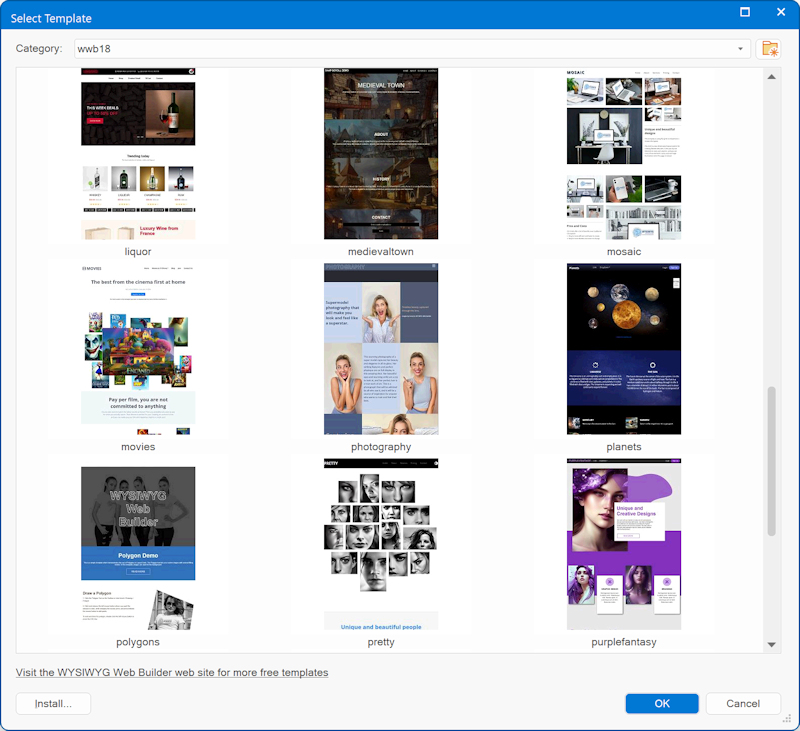
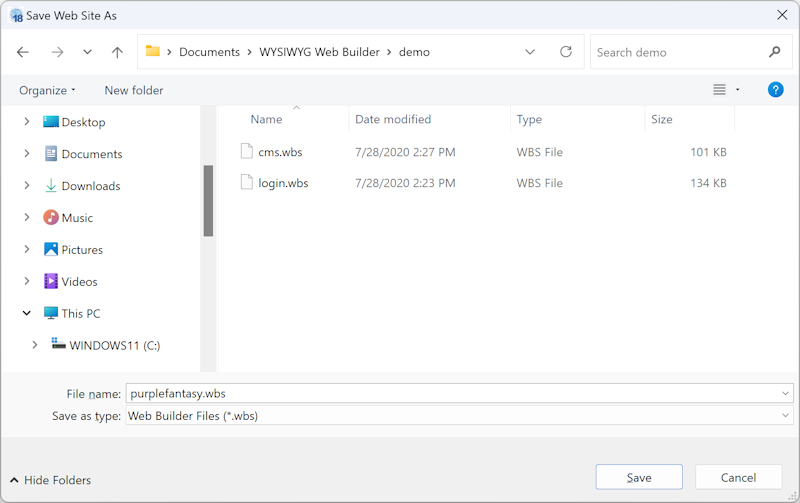
Choose a template and click OK. The Save Web Site As window will now ask you to specify a name for the web site. Enter the name and click Save to create the new web site based on the select template.
Create a new page based on a template
It is also possible to create a new page based on a template: Page -> New Page -> New Page from Template

Save website as a template
To save your own web site as template select: File->Save As Template from the menu.
Select the category and enter a name for the new template.
Select the category and enter a name for the new template.

Online Gallery
The template selection window has a dedication category 'Online Gallery'. This allows you to select a template from the online gallery without the need to manually install it first! You can also preview the template online directly via the context menu.

Online Examples
Over the years, we’ve created numerous example projects to demonstrate the various features of WYSIWYG Web Builder.
We've consolidated all our example projects into a 'Online Examples' category within the "Templates" section.
While most are simple demos showcasing specific features, they can be a great starting point or a helpful resource for discovering features you might not have thought to explore.
Related tutorial: Examples
We've consolidated all our example projects into a 'Online Examples' category within the "Templates" section.
While most are simple demos showcasing specific features, they can be a great starting point or a helpful resource for discovering features you might not have thought to explore.
Related tutorial: Examples